Duplicate with Ease
Introduced self-service class duplication to give instructors control and eliminate manual setup by support.
ROLE
UX/UI Designer
TIMELINE
3 months, alongside other product priorities
TEAM
Product Manager
4 Engineers (FE + BE) QA Engineer
SKILLS
Usability Testing
Technical Collaboration
Feature Prioritization
OVERVIEW
The lack of a Copy Class feature was a major blocker preventing academic users from migrating to 2.0.
Each semester, our Customer Success (CS) team spent hours manually recreating classes by copying settings, permissions, and assignments one by one on the legacy platform. This process was slow, error-prone, and unsustainable as our academic user base grew.
SOLUTION
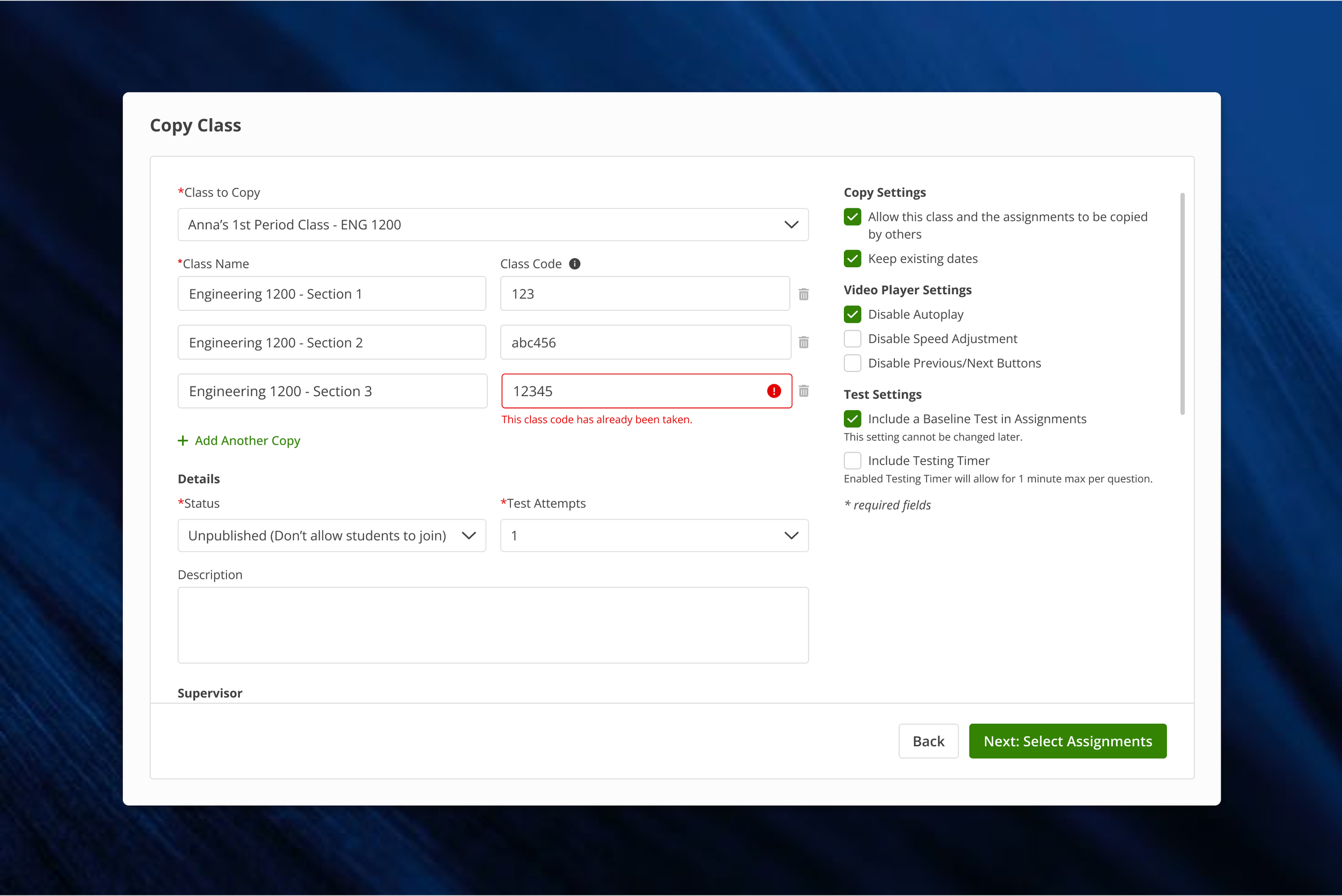
A flexible, self-service Copy Class flow that saves instructors time and reduces reliance on support.
The new feature enables instructors to duplicate existing classes with preserved settings, permissions, and assignments, all within a single, intuitive workflow. Instructors can rename classes, reorder or remove assignments, and set new available and due dates before publishing. The result is a scalable, reliable experience that reduces errors, empowers instructors to self-serve, and frees the CS team to focus on higher-value support.
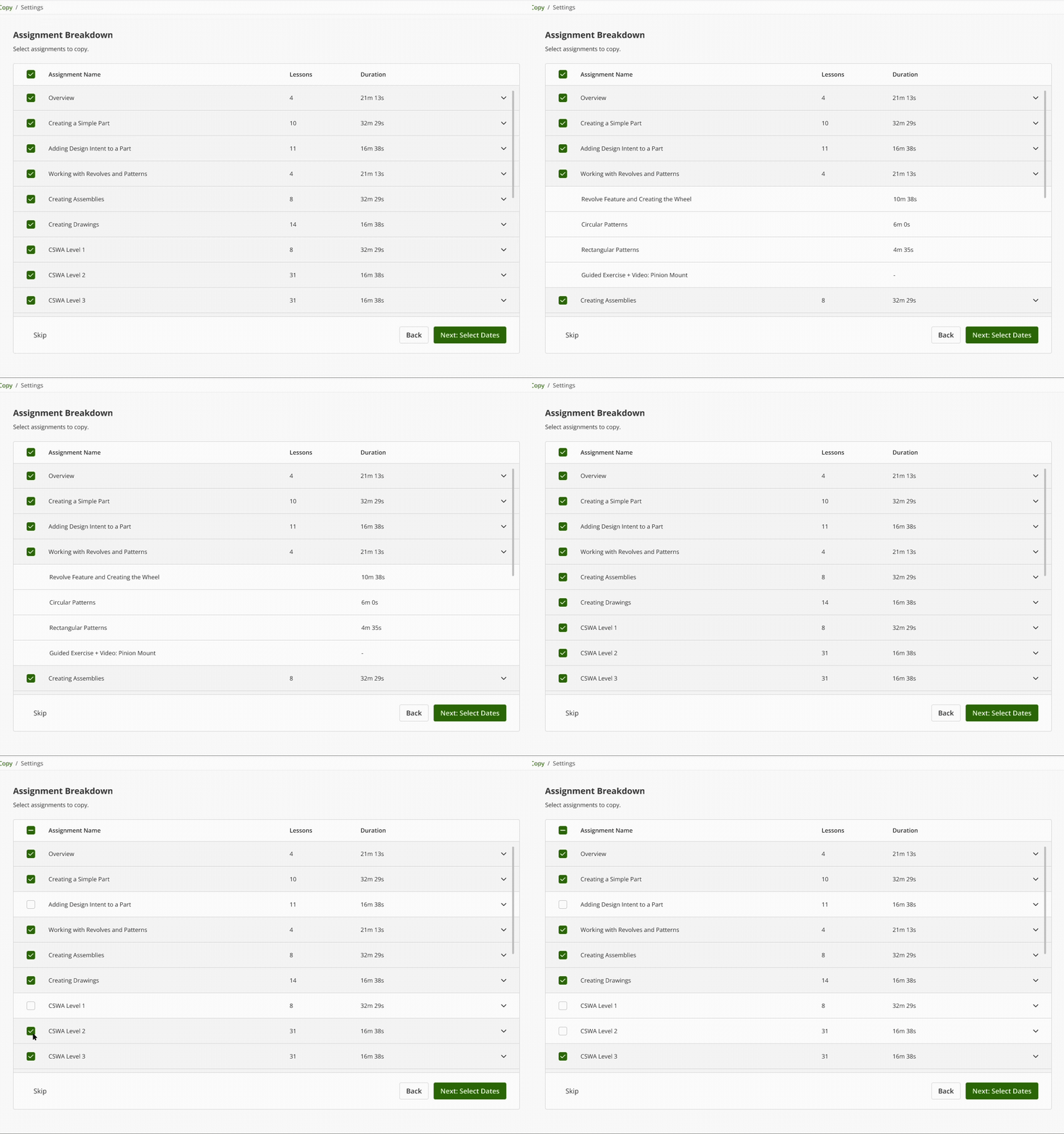
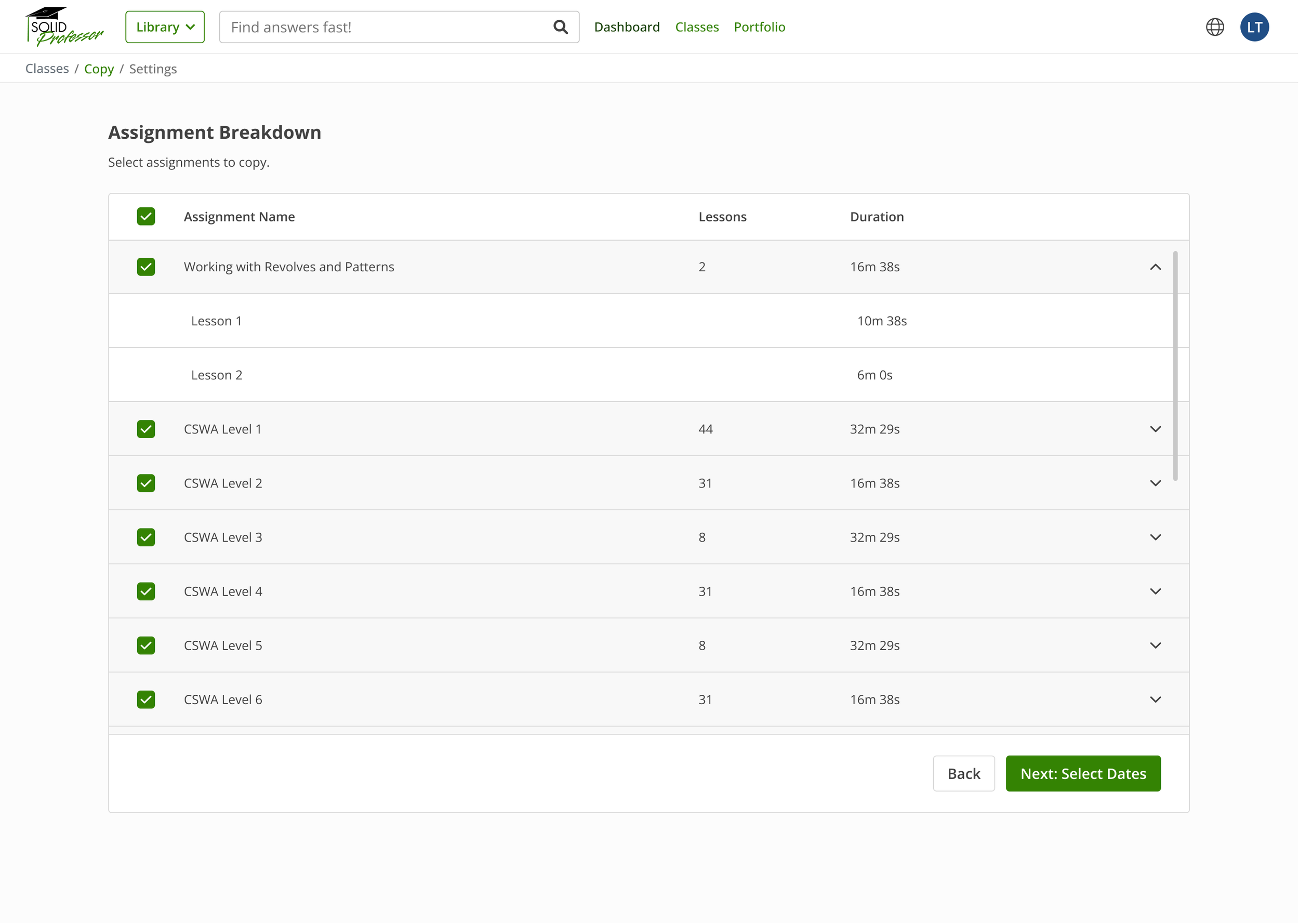
View lessons and adjust assignments to be copied in a single step.
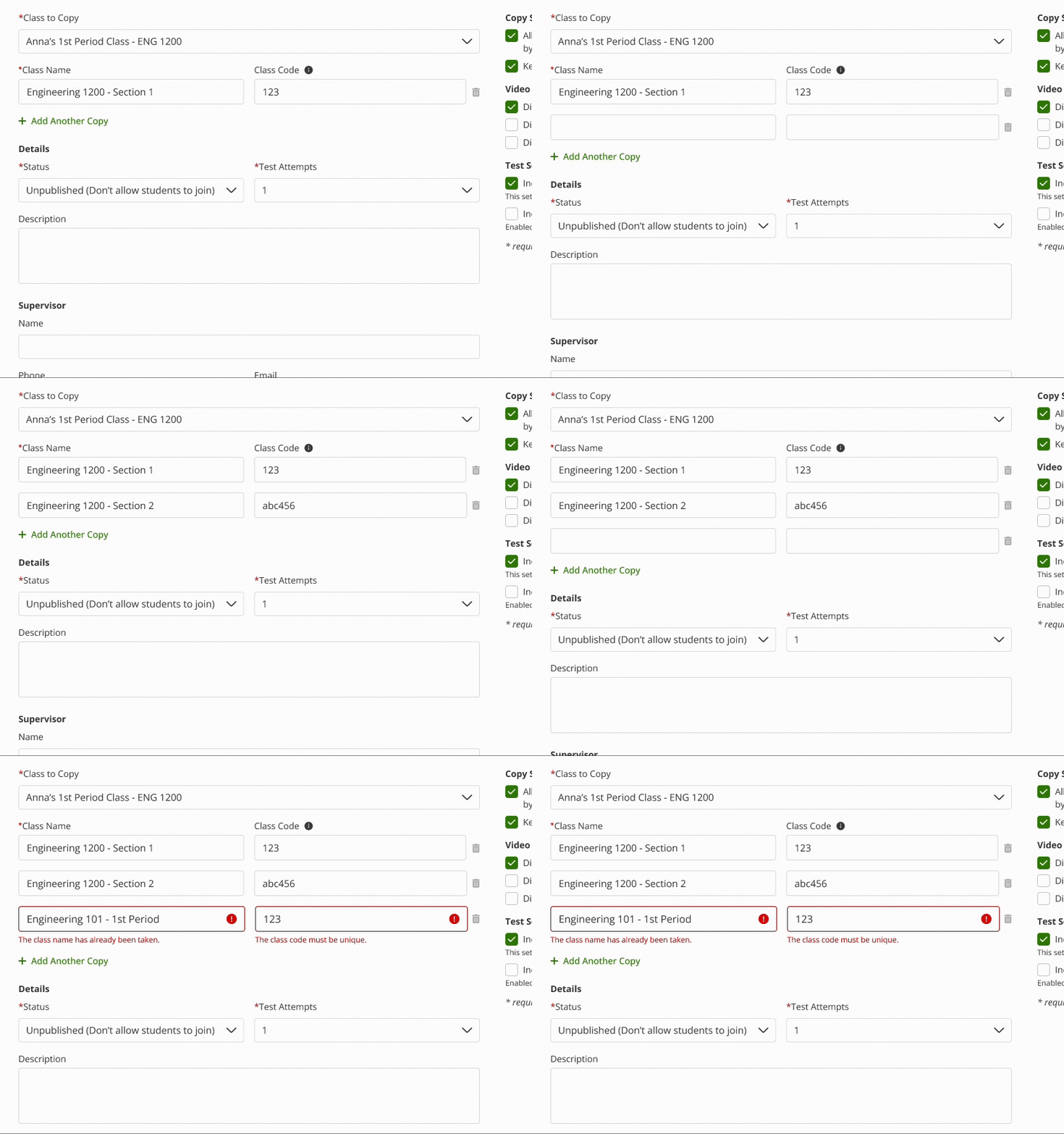
Add multiple class copies in one step with instant name and code validation.
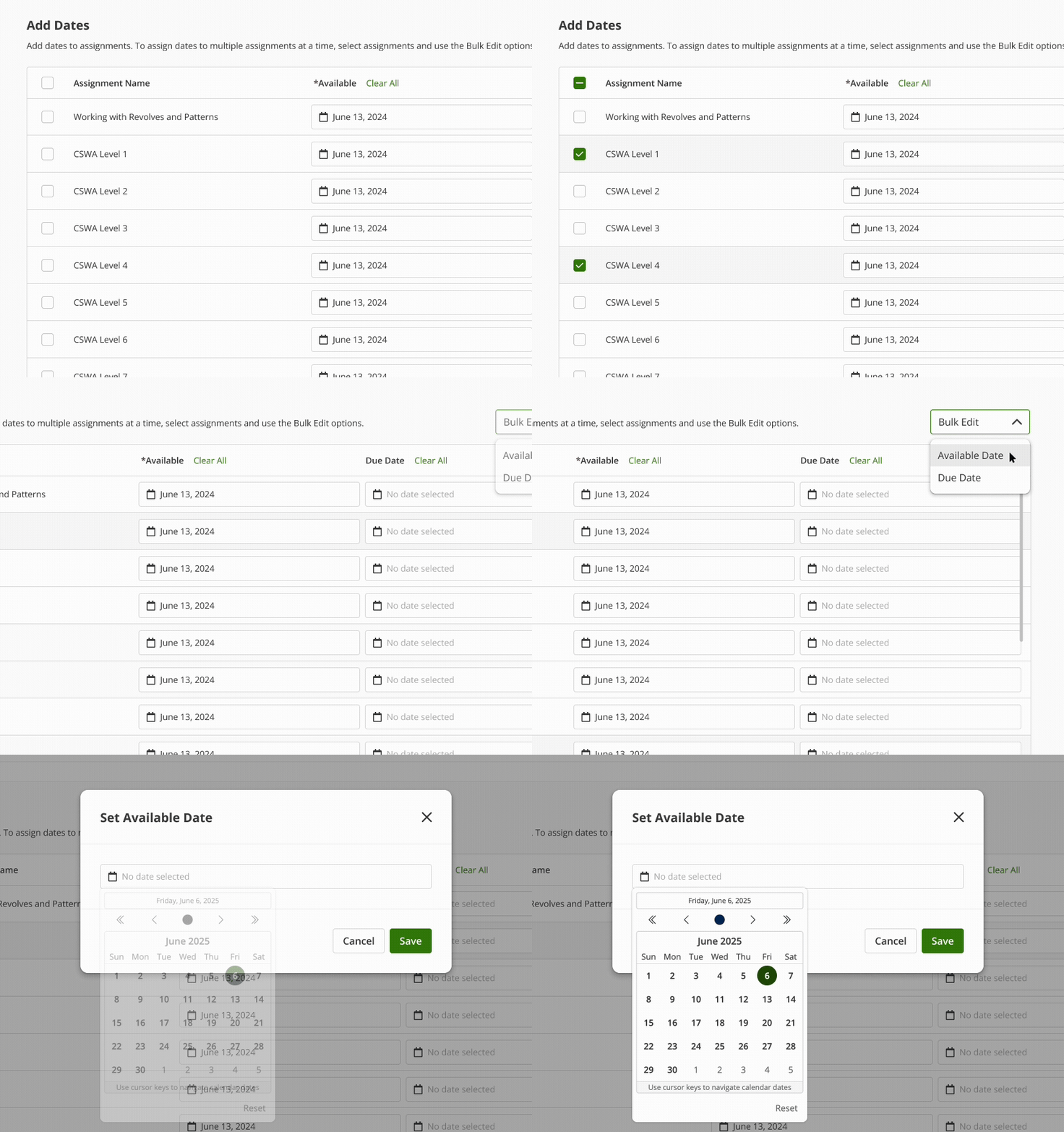
Update all assignment dates at once with ease.
Manual and time-consuming
Copying a class took ~20 minutes per class, often repeated dozens of times each semester.
Over-reliance on Customer Success (CS)
Instructors couldn’t self-serve and had to rely heavily on CS to copy classes on their behalf.
Instructor workarounds
To avoid the process, some instructors built large shared classes with multiple instructors and students, sacrificing flexibility and customization.
Cumbersome process
CS staff copied assignments one by one, often out of order, requiring multiple screens to compare originals to copies.
Error-prone and inconsistent
Manual setup of assignments, permissions, and settings increased the risk of mistakes.
INITIAL FINDINGS
Auditing the legacy workflow and speaking with CS revealed key pain points:
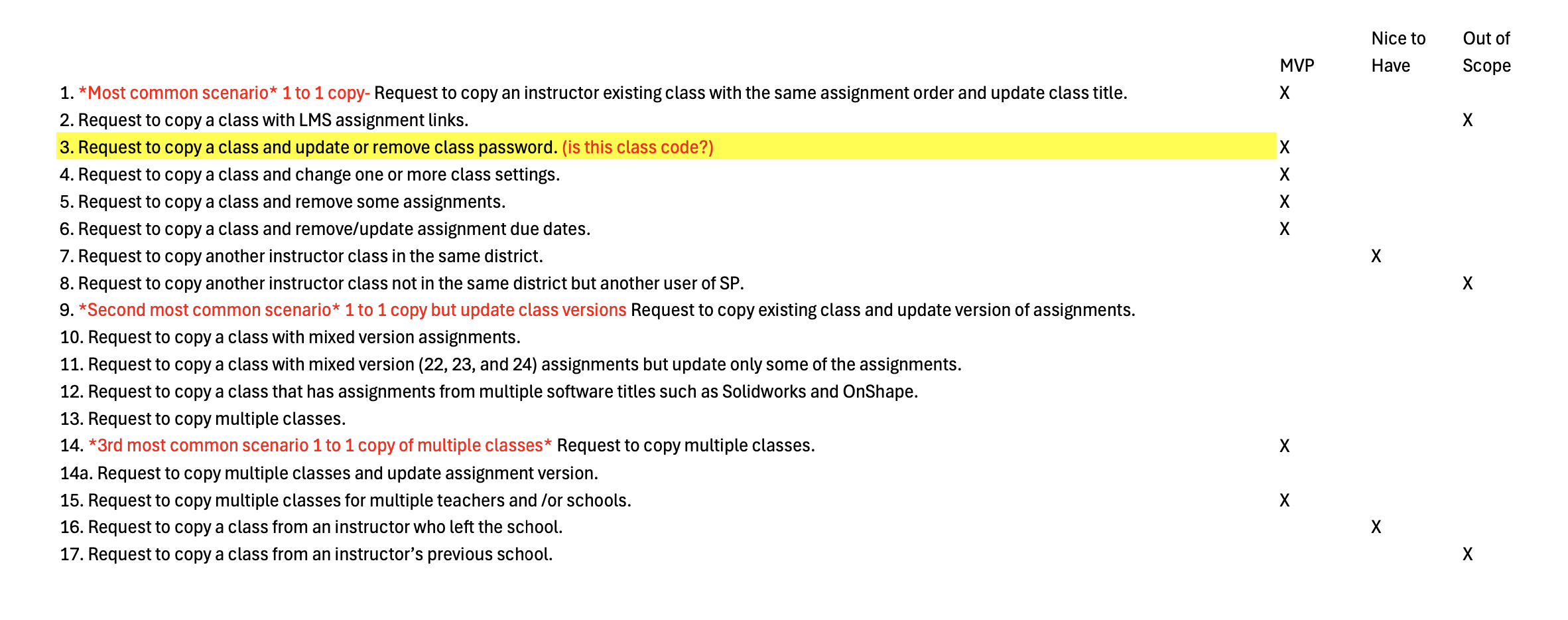
Prioritization matrix of copy class scenarios by instructor frequency and MVP scope
Mapped instructor requests to requirements and prioritized by frequency and impact:
Preserve class settings and permissions
Retain or adjust assignments (add, remove, reorder)
Set available and due dates within the copying flow
Support “shell” classes that preserve structure for later setup
Allow multiple class copies in one action
Instructors currently lack a flexible, guided way to copy classes, forcing them to rely on Customer Success for manual setup. This leads to setup errors, wasted time, and inefficient class management each semester.
PROBLEM STATEMENT
DESIGN PROCESS
Guided by the goal of saving instructors time and reducing support dependency, I designed a self-service Copy Class flow that preserved settings, permissions, and assignments while keeping the experience simple and reliable.
Exploration
Explored multiple approaches, from a simple quick-copy modal to a more robust, full-page experience that balanced flexibility with ease of use. Collaborated with the PM to define MVP scope and focus on high-impact functionality, while working closely with engineers to understand data dependencies and ensure technical feasibility.
Collaboration + Iteration
Validated concepts through navigation, preference, and prototype testing. Feedback from users, engineerings and the CS team led to guardrails such as unique class naming, inline validation, and clearer date labeling. Applied accessibility improvements including strong contrast, clear step indicators, and consistent hierarchy across devices.
USABILITY TESTING
Goal
Evaluate how easily users could locate, understand, and complete the Copy Class flow through navigation, preference, and prototype testing.
Method
Conducted two rounds of usability testing with 12 participants using Lyssna. The first round focused on navigation success and design preference, while the second evaluated task completion and gathered qualitative feedback on ease of use.
Navigation Test
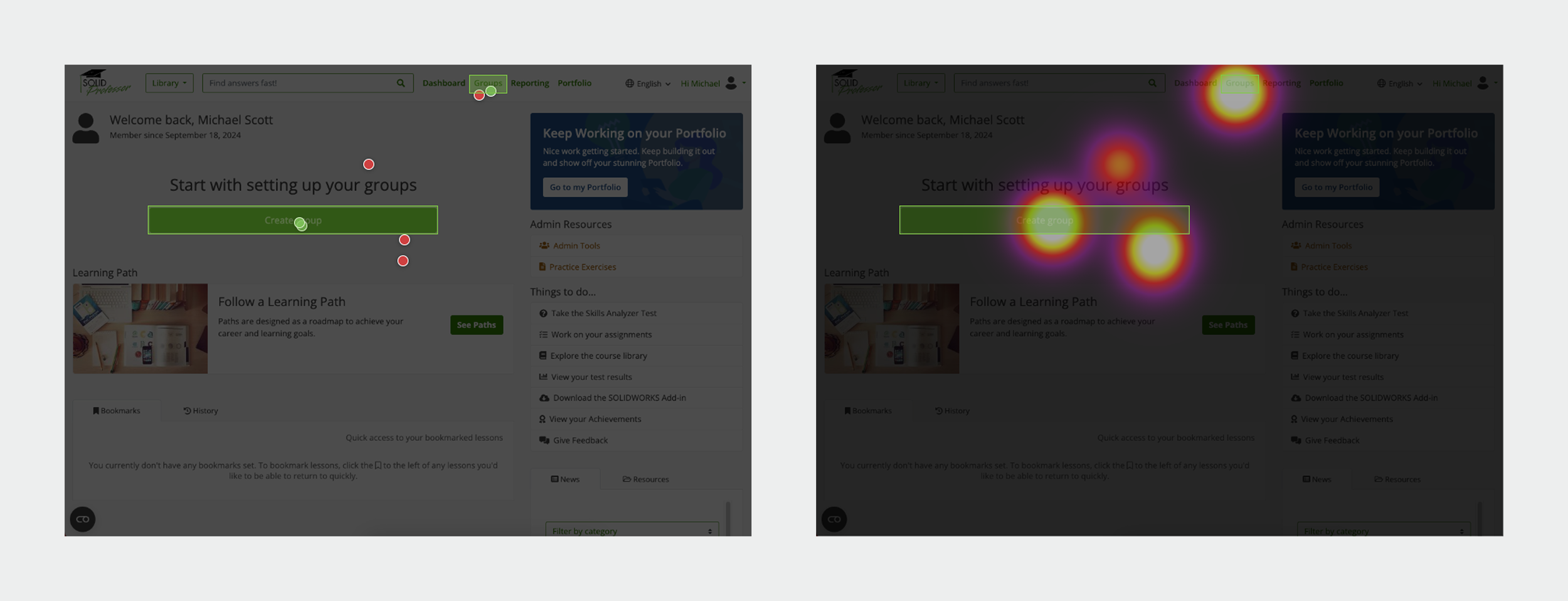
Click map
Heat map
What we tested: Discoverability — whether users understood that the “Copy Class” option lives within the “Create” button.
Result: Only 43% successfully found the correct action. Most clicked “Create Class” or nearby areas, assuming the entire component was clickable.
Insight: Four of seven participants associated copying with “Classes” or “Create Class,” but the rest were uncertain, showing that the relationship between “Create” and “Copy” was only partially intuitive and needed clearer visual cues.
Preference Test
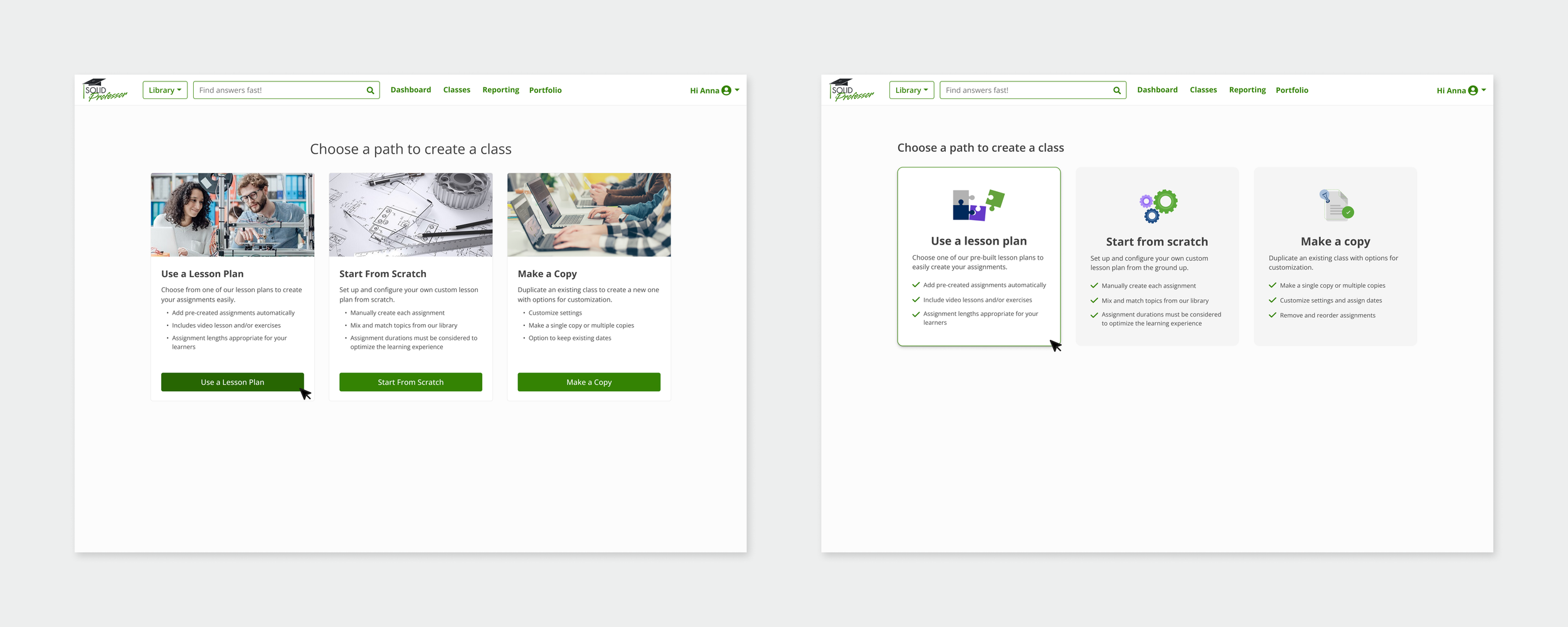
Design 1
Design 2
What we tested: Which design layout users found clearer and easier to navigate.
Result: 86% of participants preferred Design 1.
Insight: Users described Design 1 as “easy to scan” and “more direct,” confirming that minimal layout and strong visual hierarchy improved comprehension.
What we tested: Overall ease of use and clarity of the Copy Class flow.
Result: 100% task success rate across five participants, with an average completion time of 1:42.
Insight: Once users located the Copy action, the flow felt smooth and intuitive. Feedback emphasized improving initial discoverability, clarifying where the copied class appears, and reducing redundant steps.
User feedback:
“Once I found it, copying was really easy.”
“I wasn’t sure where the new class went after copying.”
Prototype Test
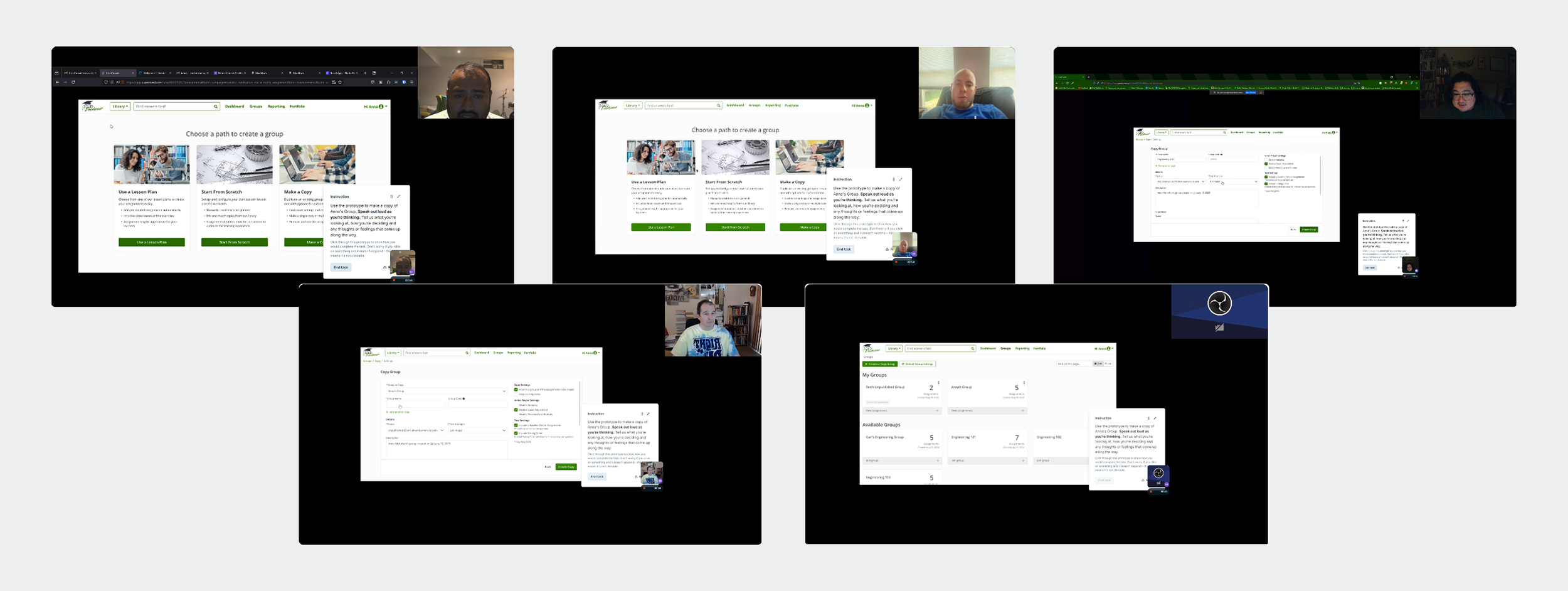
Screenshots from user testing
DESIGN CHANGES BASED ON USER FEEDBACK
Clarified primary action
Before
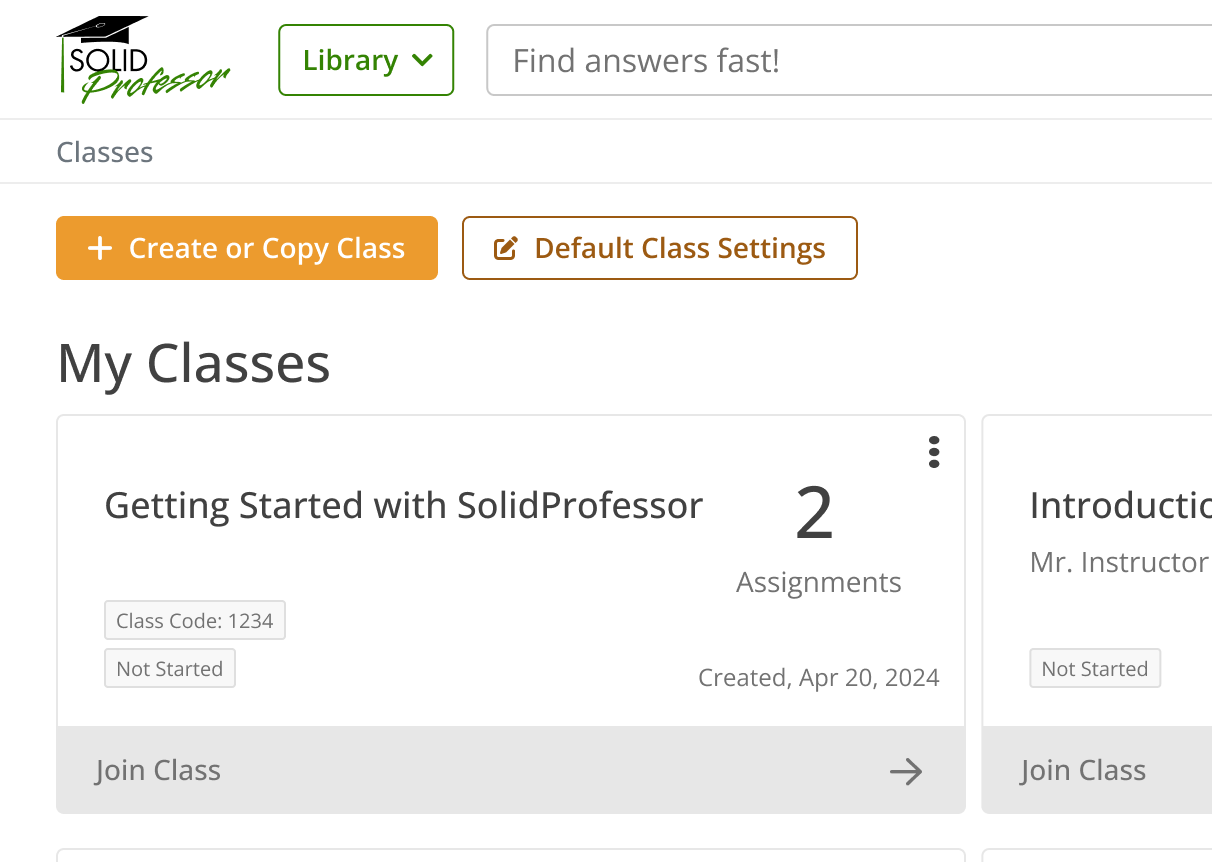
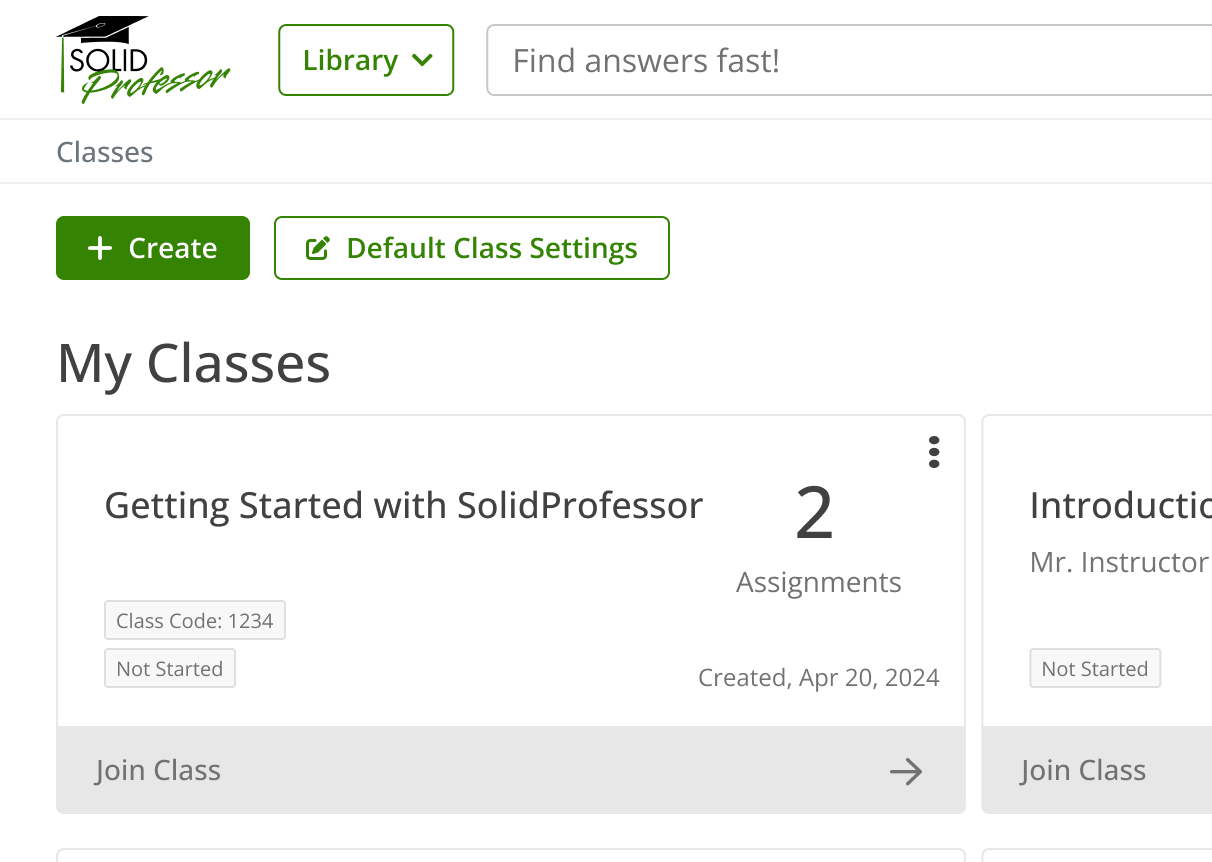
The button label “Create or Copy Class” caused hesitation during testing, as users weren’t sure if it would create or duplicate. We changed it to “Create” since both the breadcrumb and page heading already include “Classes,” providing context for users. The button color was also updated from orange to green to align with our platform’s primary action style, reinforcing visual consistency and meeting accessibility standards for color contrast.
Added flexibility
Before
After
After
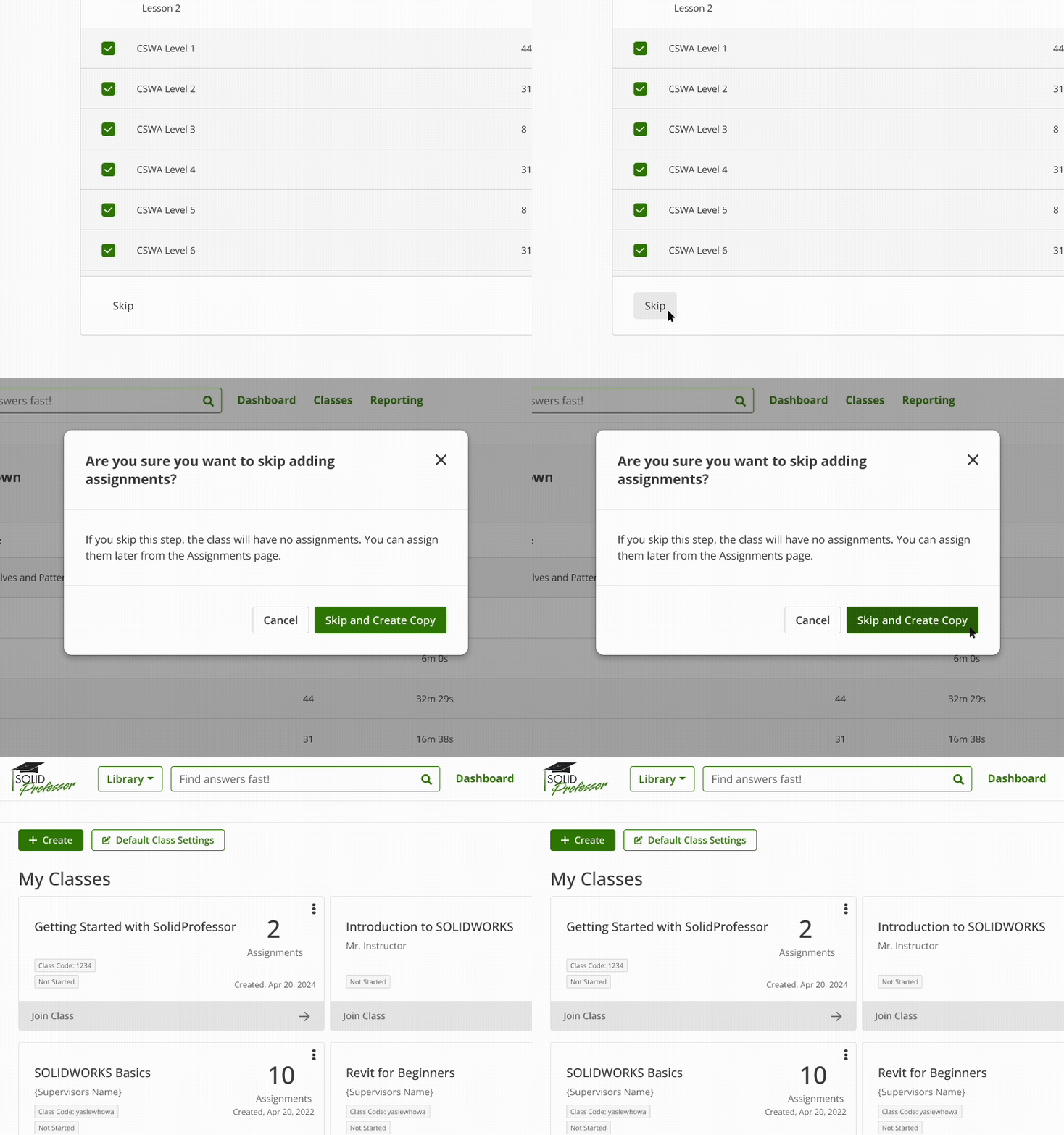
Based on instructor feedback, we introduced the ability to skip adding assignments when copying a class. This allows instructors to replicate class settings and structure first, then add assignments later — a common workflow for instructors preparing future courses.
Improved feedback and visibility
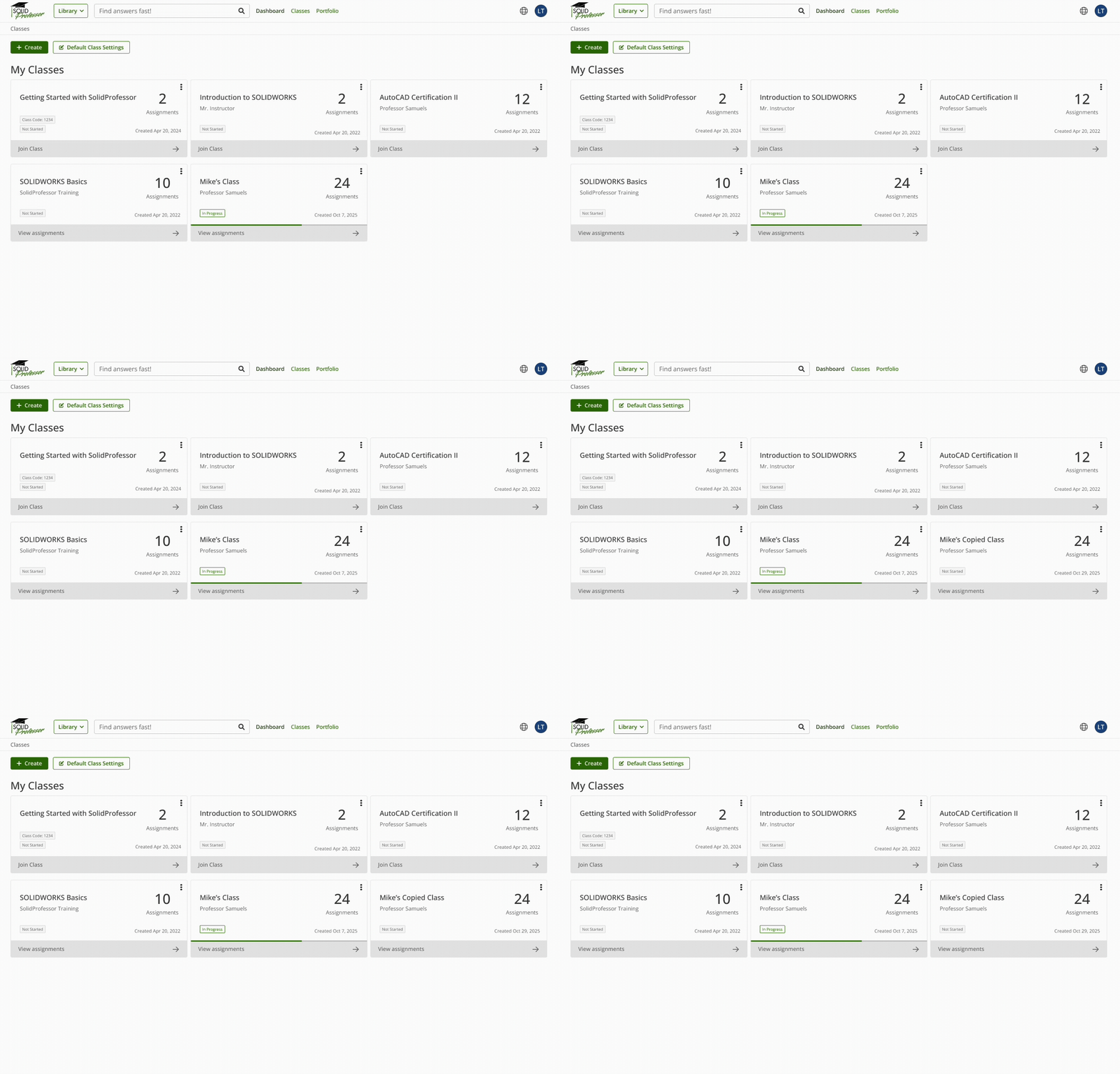
Before
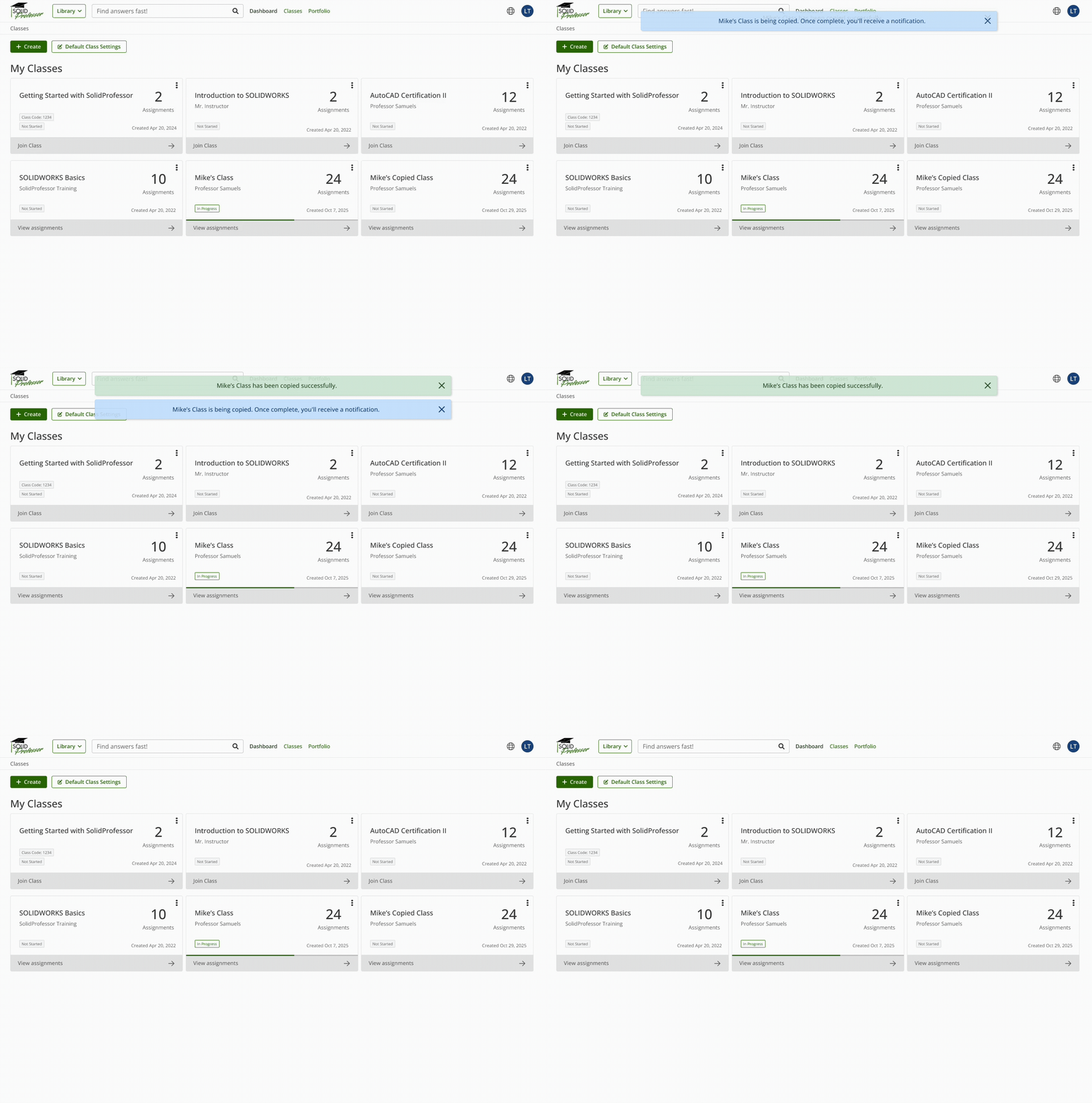
After
Instead of instantly displaying a new class shell with no feedback, users now see a message confirming that the copy is in progress, followed by a success or error alert once all lessons finish processing, even if they’ve navigated away from the Classes page.
CHALLENGES + CONSTRAINTS
Design Complexity
Balancing simplicity for instructors with the technical complexity of preserving class data required careful tradeoffs.
Build Sequencing
Limited early engineering input led to inefficient sequencing and rework, reinforcing the importance of early cross-functional alignment.
OUTCOMES + IMPACT
20+ minutes saved per class
Previously, CS manually copied each class one by one, often dozens per semester. The new flow allows instructors to complete the process independently in under two minutes.100% task success rate
All participants in usability testing successfully copied a class using the new flow.1:42 min average completion time
Users completed the full copy flow quickly and without errors.Reduced CS workload
By enabling instructors to self-serve, the feature eliminates dozens of manual copy requests per school term.Lower likelihood of improper class sharing
Easy class duplication reduces cases where instructors reuse classes across schools or cohorts.
FINAL SOLUTION
A self-service Copy Class feature that let instructors replicate classes, preserve settings, and flexibly adjust assignments and dates within the same flow.

Final Copy Class flow showing a guided, self-service experience for instructors.
REFLECTION
What I learned
Align Early, Build Smarter
Testing in phases clarified the experience, but the initial build order created avoidable rework. Earlier engineering input would have surfaced dependencies sooner and streamlined development.
Design for Flexibility and Growth
Structuring the feature in smaller, modular parts allowed us to release iteratively, gather feedback, and scale over time.