Scaling Academic Management
Modernizing enrollment and instructor/admin workflows in 2.0
ROLE
UX/UI Designer
TIMELINE
~1 year across multiple initiatives
TEAM
Product Manager
4 Engineers (FE + BE) QA Engineer
SKILLS
Stakeholder Research
Usability Testing & Iteration
Prototyping
OVERVIEW
As part of the migration from the legacy system to 2.0, I led the design of tools that modernized key workflows for Customer Success (CS), instructors and admins.
Previously, these processes were slow, manual, and error-prone. CS teams managed most instructor requests through outdated systems. Over the course of a year, I partnered with Product, Engineering, and CS to redesign four critical workflows that enabled scalability, reduced reliance on support, and improved data accuracy across the platform.
SOLUTION
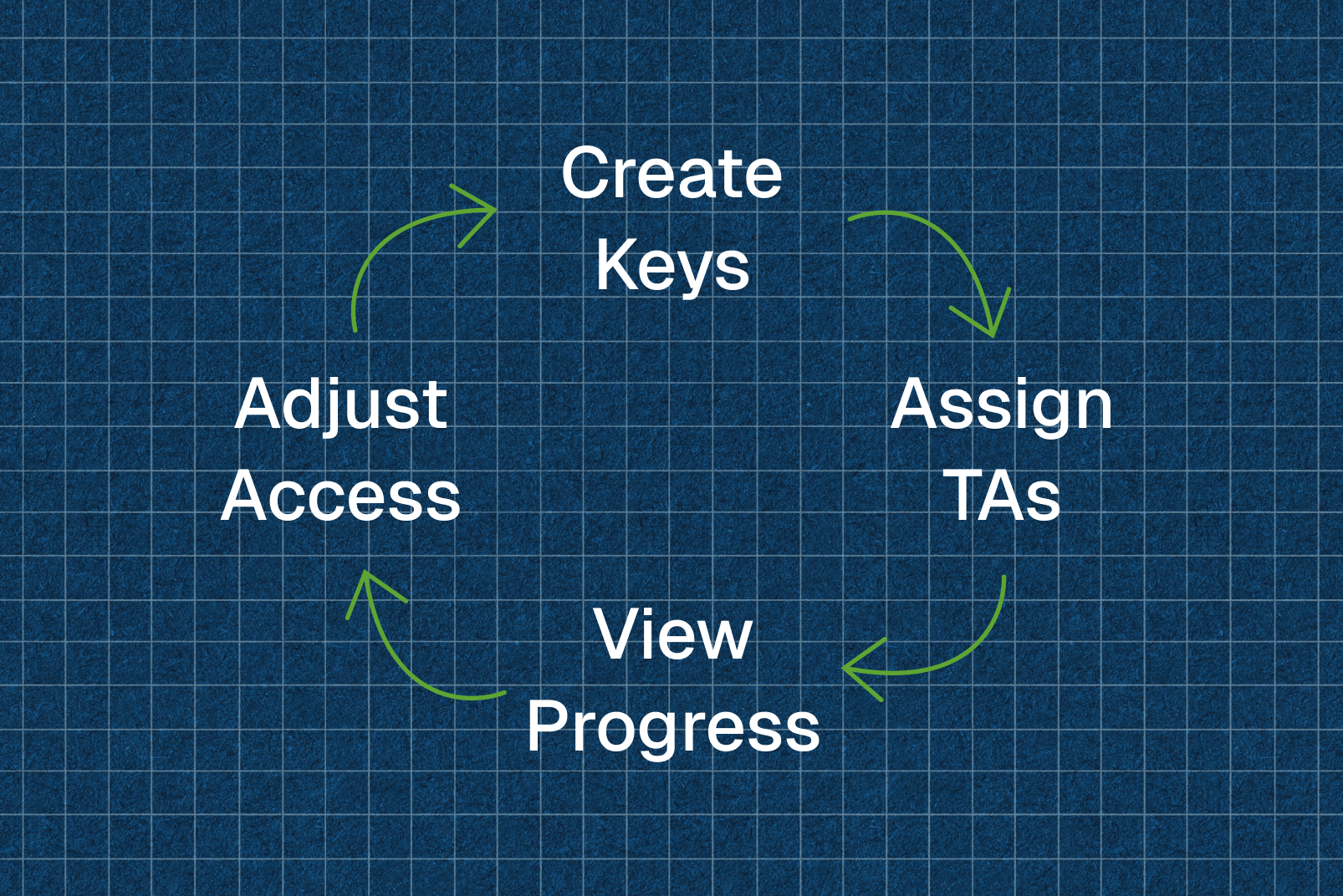
Delivered a unified suite of self-service tools for CS teams and academic users, reducing friction across the full enrollment and management lifecycle.
Highlights:
20+ minutes saved per class setup
100% task success in testing
Faster membership resolutions (days → minutes)
Improved data accuracy and learner visibility
INITIAL FINDINGS
As part of the 2.0 migration, our pod was tasked with rebuilding legacy academic workflows that blocked schools from transitioning to the new platform.
Key focus areas:
Internal efficiency (CS tools): Outdated systems forced CS to manually manage enrollment keys, TA permissions, and membership fixes, resulting in slow, repetitive, and error-prone processes.
End-user experience (Instructor & Admin tools): Instructors struggled with limited learner visibility, inaccurate data, and slow dashboards.
Goal: Deliver modern, self-service tools that improved efficiency, restored academic parity, and established a scalable foundation for 2.0.
PROBLEM STATEMENT
Outdated academic tools required CS and instructors to manage setup and reporting through slow, manual processes. Modernizing these workflows was essential for efficiency and a scalable 2.0 experience.
FEATURE HIGHLIGHTS
Internal Tools for Customer Success
Before
After
Feature #1: Enrollment Key Creation
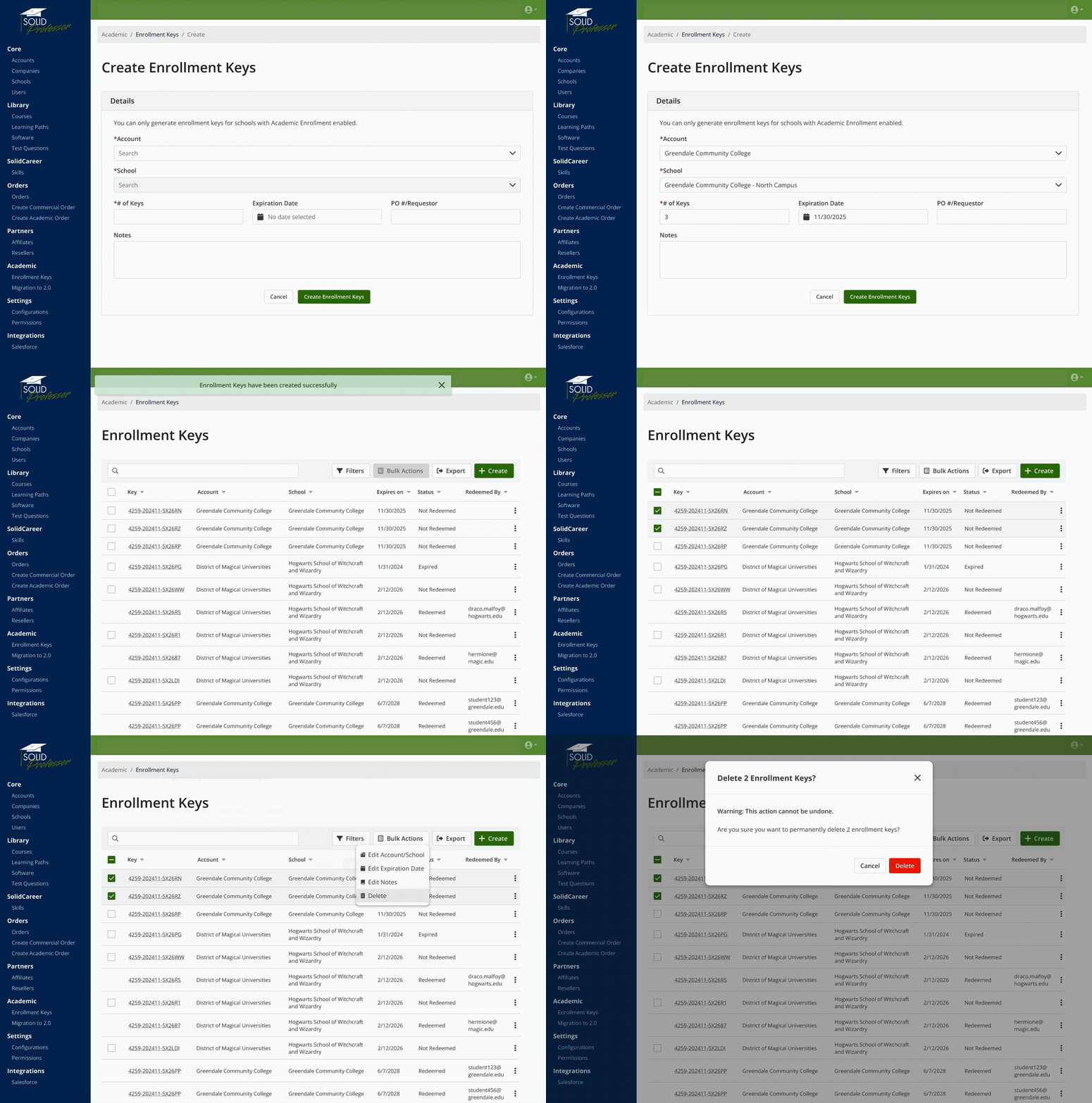
Before: Manual, confusing process with outdated UI, limited visibility and no bulk editing.
Design:
Consolidated creation, editing, and deletion into one streamlined flow.
Added search, filtering, real-time validation and bulk actions.
Partnered with engineering to ensure key validity and compatibility across legacy and 2.0 systems.
Outcome: Simplified UI that reduced CS setup time and errors; introduced webhook support for future automation and bulk operations.
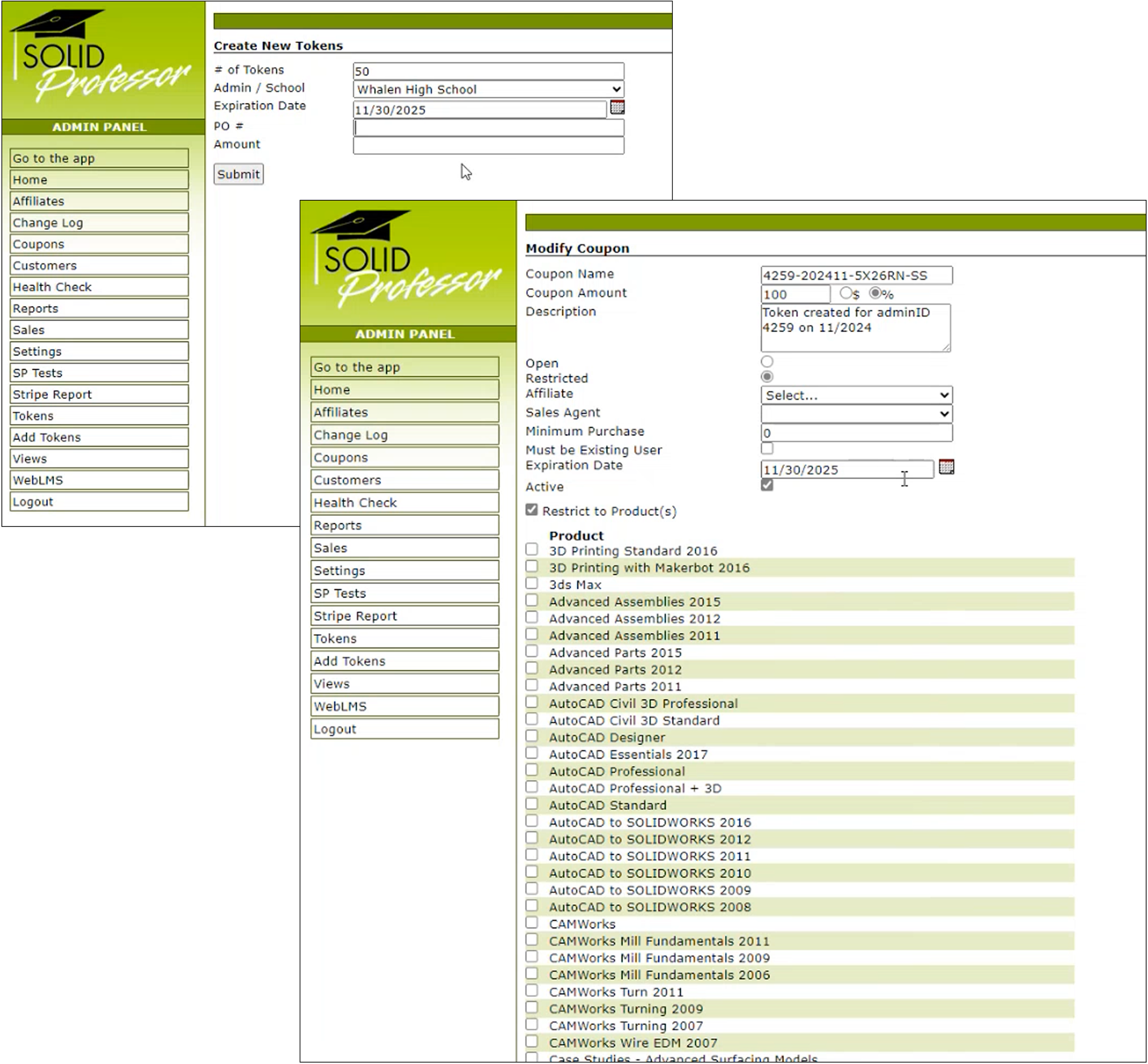
Feature #2: Teaching Assistant Role Management
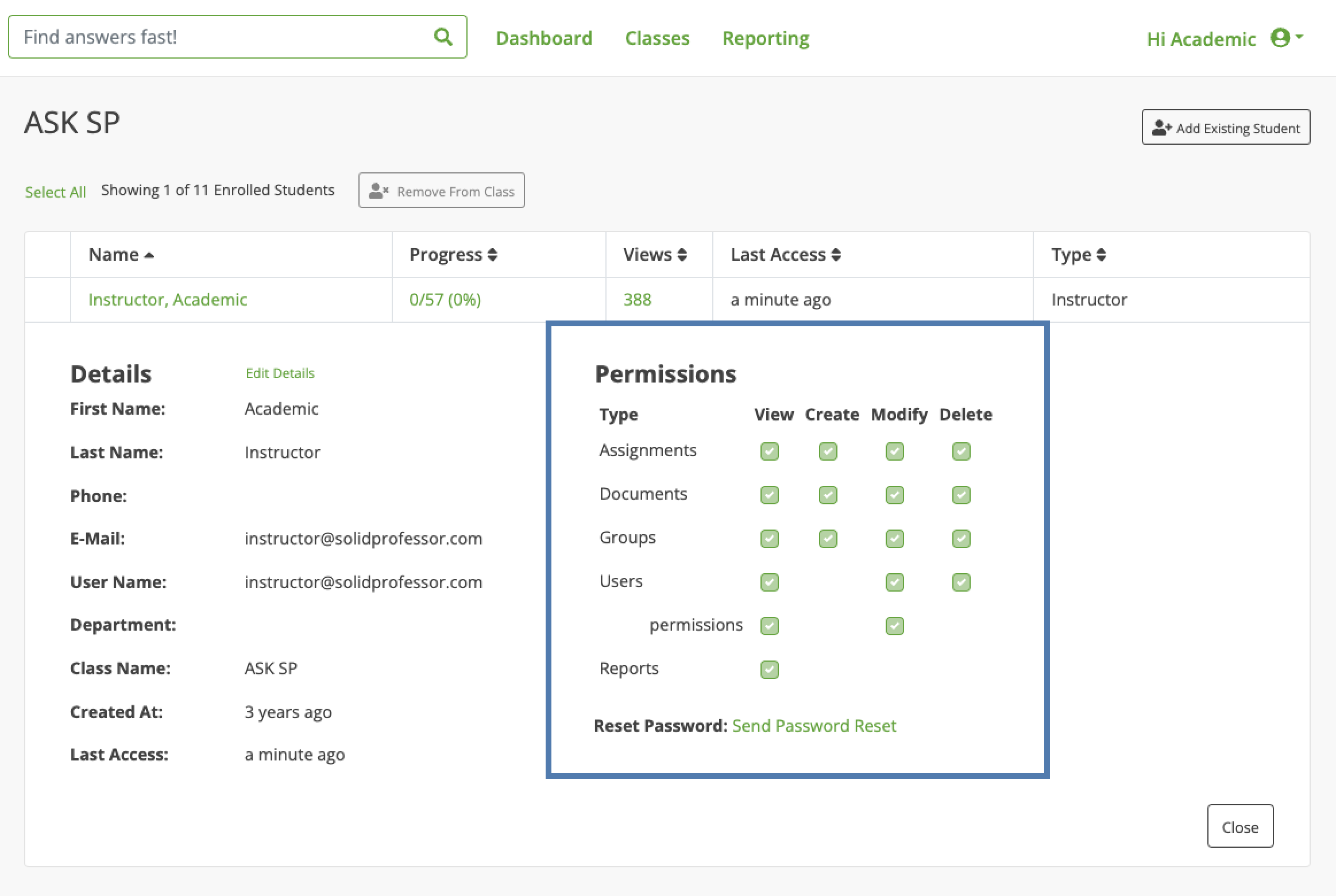
Before: TA permissions were controlled through a confusing matrix with no role designation, no expiration logic, and no way to quickly see who had access. Instructors sometimes attempted to navigate or exploit the matrix, and CS had to manually update or end access for every TA across every class.
Design:
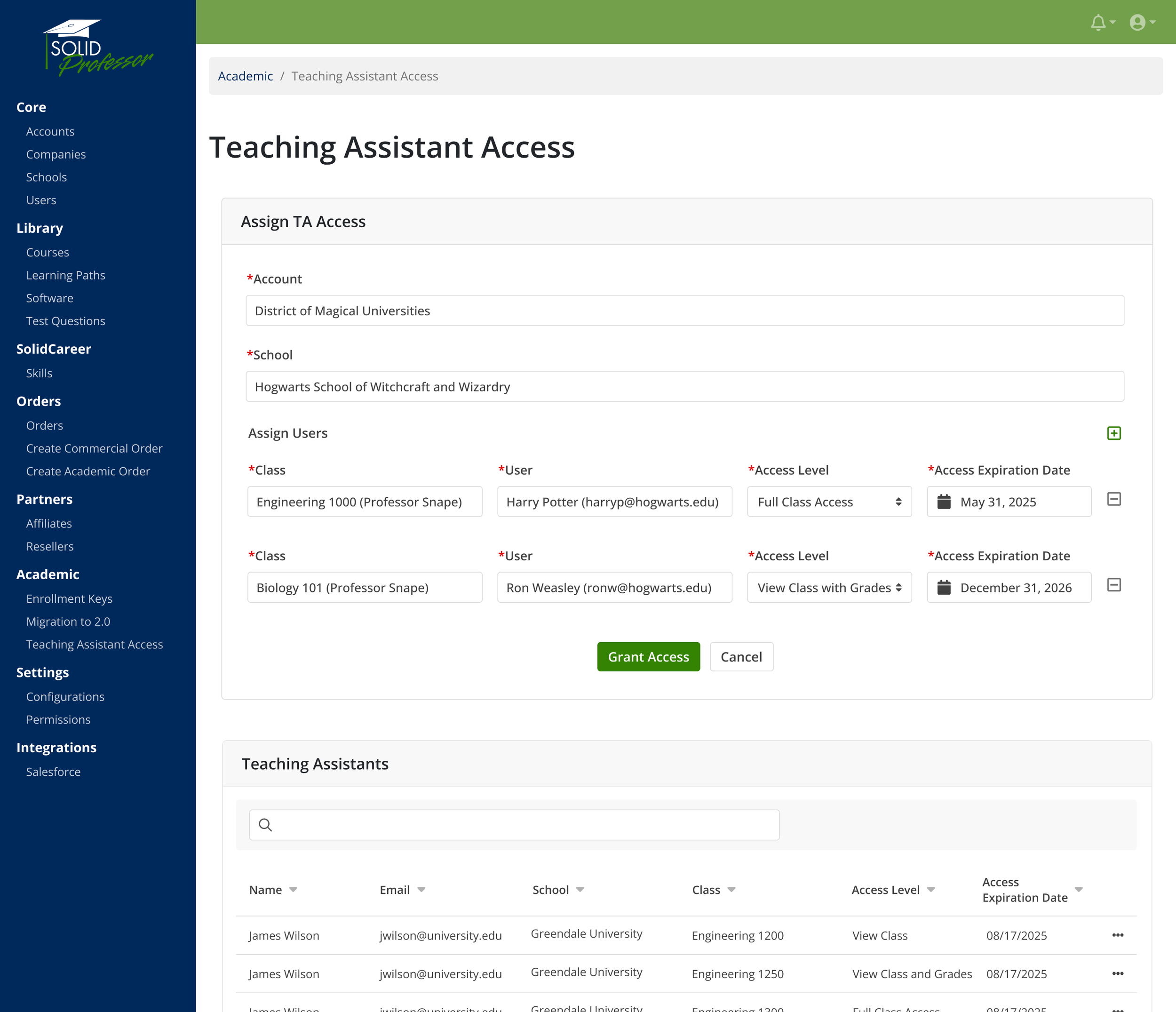
Moved TA management into the admin portal so only CS can assign or adjust permissions.
Defined a clear two-tier TA role structure with automated expiration dates.
Enabled users to be TAs in multiple classes and allowed classes to have multiple TAs with different permission levels.
Added a searchable, sortable TA table for quick lookup across schools.
Built internal tooling for safe assignment and removal, minimizing misuse and confusion.
Outcome: A centralized, controlled system that streamlined TA management, reduced manual workload, improved visibility and accuracy across classes, and established a scalable foundation for a future instructor-facing version.
Feature #3: Manual Order Creation
Before: CS had no simple way to adjust memberships or extend access. They had to navigate a 10+ step “sales wizard” to create orders and often relied on engineering for basic fixes.
Design:
Identified common scenarios (access extensions, setup fixes, refund corrections) and designed a streamlined membership adjustment flow.
Added a Create Order action directly within a user’s admin record, opening a modal with prefilled user info, an expiration date picker, and a notes field.
Built in validation to prevent missing dates or selecting dates earlier than an active membership.
Tested with CS to refine clarity, reduce errors, and ensure the flow fit naturally into their existing workflows.
Outcome: A fast, self-service tool that lets CS adjust or extend memberships in minutes instead of days. The tool reduced reliance on engineering, improved support speed, and ensured consistent, accurate membership updates.
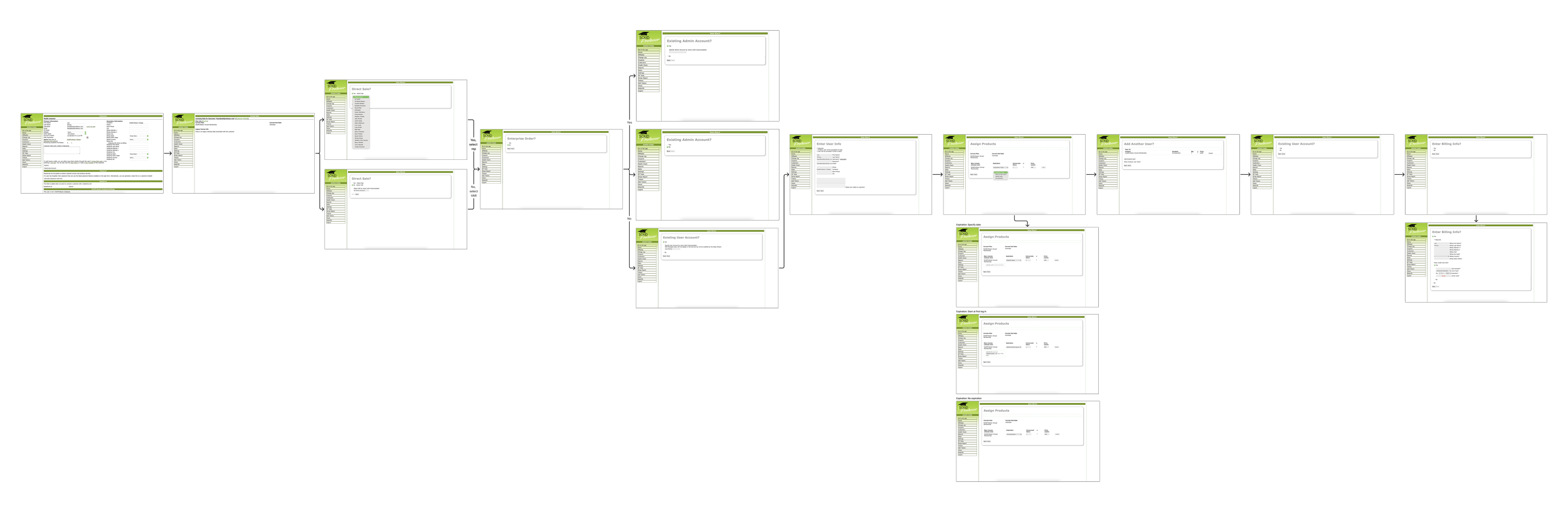
Before
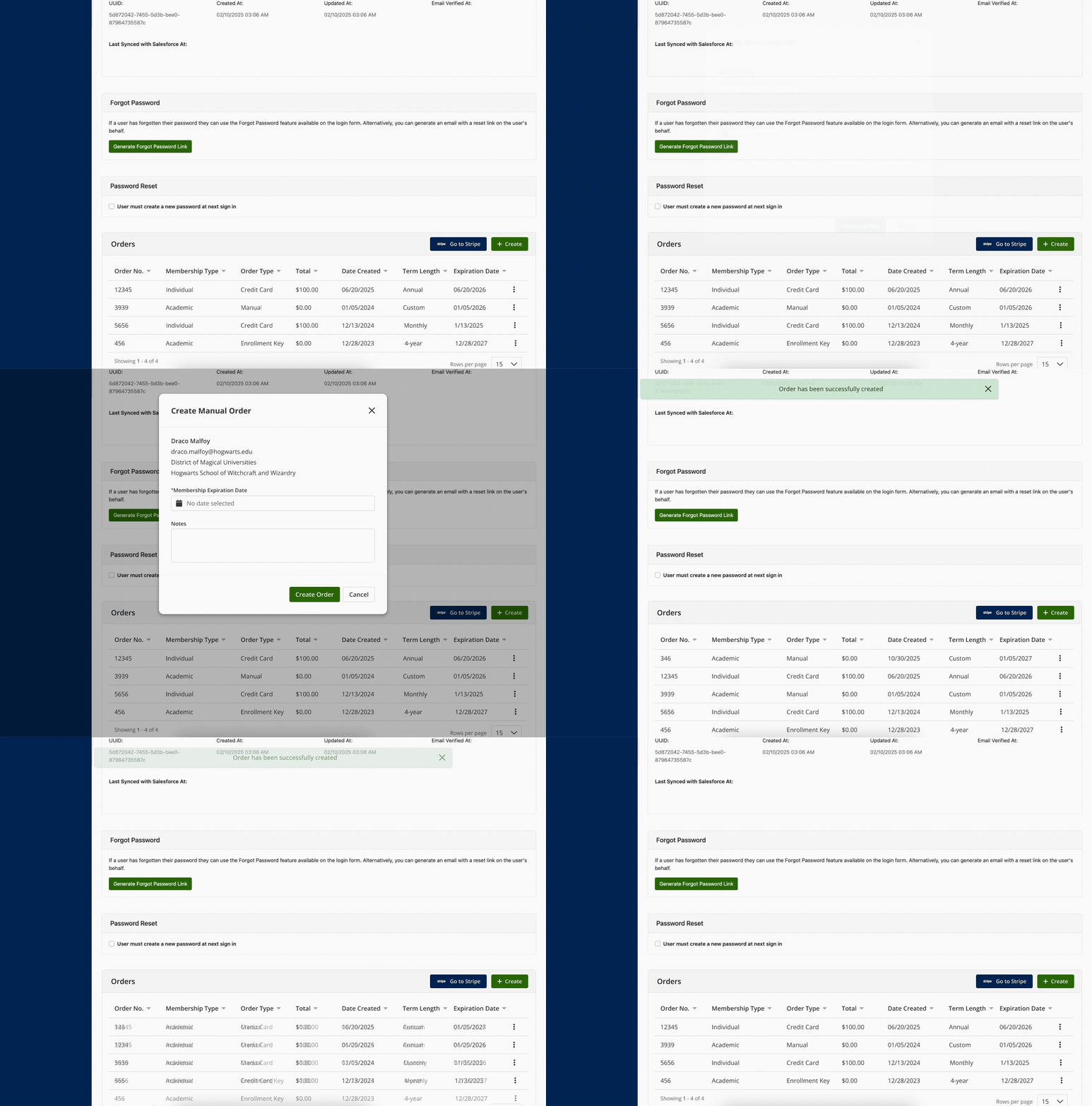
After
End-User Tools for Instructors & Managers
Feature #4: Instructor & Admin Tools
Before: A slow, cluttered interface with inaccurate data, limited search, and limited visibility into learner progress.
Design:
Re-architected the information hierarchy and data tables for speed and scalability.
Introduced a Learner History modal with lessons viewed, tests, certifications, and enrollment details.
Added search, PDF export, and improved filtering to streamline reporting workflows.
Usability Testing Highlights
Tested with 6 participants (commercial end users and customer CSMs) to evaluate clarity, efficiency, and task success.
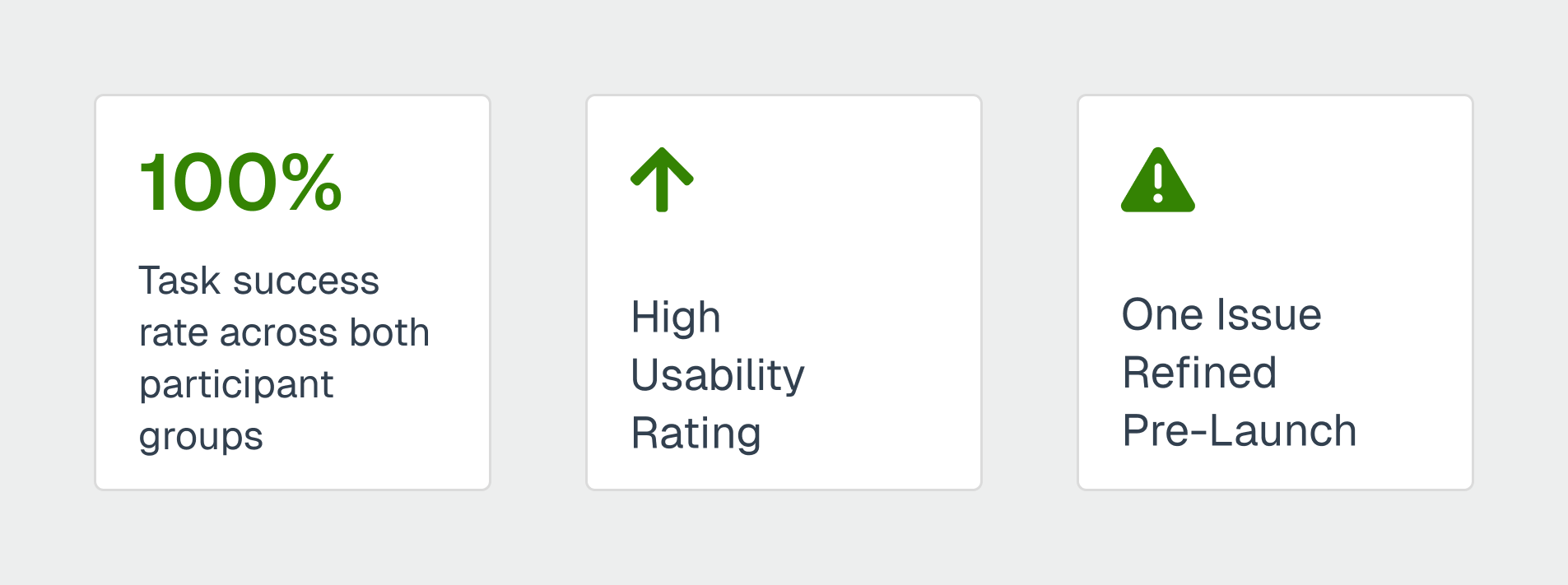
Task success: 100% across both participant groups
Overall usability: 4.125 / 5
Key insight: The “Delete from Account” action scored lower, prompting clearer language and confirmation steps.
Supporting evidence: Participants described learner data as “well organized,” “intuitive,” and “easy to find.” One CSM noted the full history view as “a great new feature.”
Outcome: Improved performance, accurate class metrics and clear learner insights which established a scalable foundation for future analytics and reporting.
Before
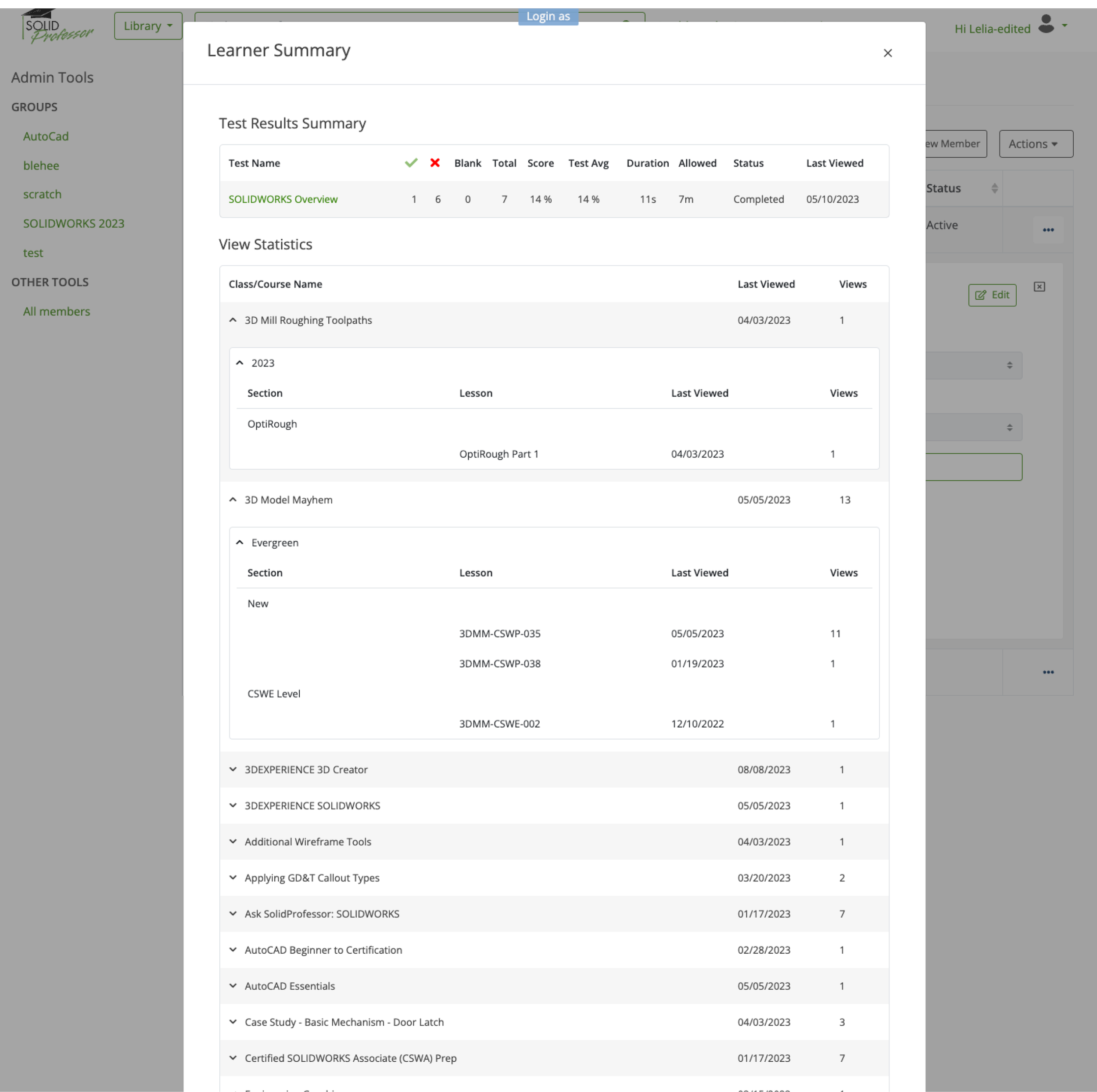
Before
After
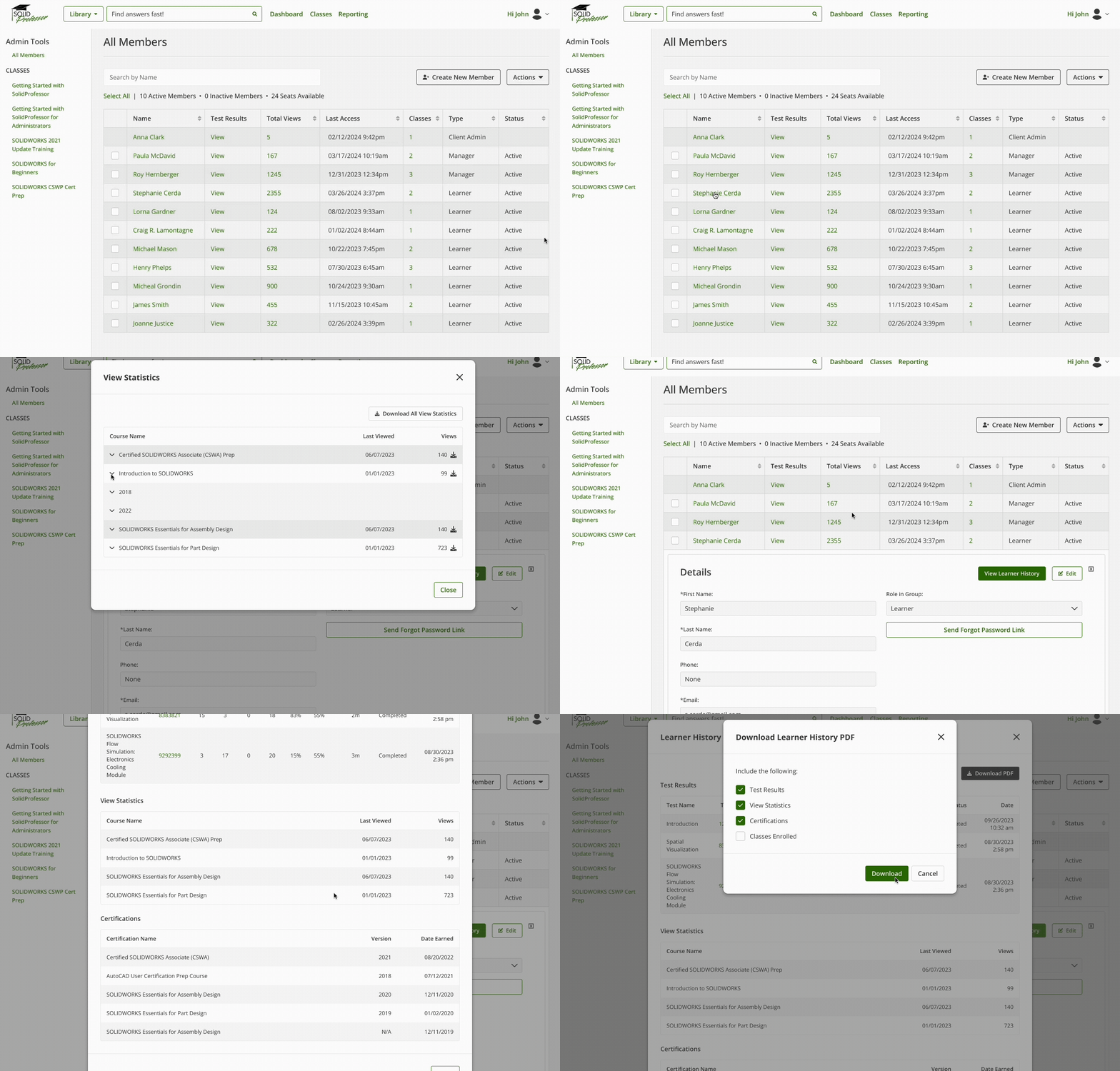
After
CHALLENGES + CONSTRAINTS
Legacy Dependencies
Many workflows had to function in both the legacy system and 2.0 during migration. This limited how much we could change the structure of the workflows or introduce new logic.Enrollment Keys had to be created in 2.0 but still recognized by the legacy checkout flow until all schools were fully migrated, which constrained how far we could simplify fields or restructure the key lifecycle.
Cross-Team Alignment
Different teams had different priorities and risk tolerances. For example, the TA feature was originally designed for instructor self-service, but CS raised valid concerns about reporting accuracy, auditing, and potential misuse. This required pulling the feature back to an internal-only release, refining permissions logic, and building trust with their team before expanding access.
OUTCOMES + IMPACT
Reduced CS workload
Self-service tools replaced time-consuming manual processes.Improved data accuracy and visibility
Redesigned instructor/admin views ensured reliable class metrics, clearer learner visbility and faster load times.Faster customer resolution
Manual Order and TA management allowed CS to resolve access issues without engineering support, reducing turnaround from days to minutes.Scalable foundation for 2.0
Rebuilt workflows achieved academic parity across legacy and 2.0 and established the groundwork for future instructor-facing automation for TA management.Strengthened UX maturity
Usability testing and analytics validation influenced roadmap decisions and increased cross-team confidence in UX-led iteration.
Key Metrics
20+ minutes saved per class setup
100% task success in usability testing
4.125 / 5 usability rating from CSMs and instructors
Multiple legacy workflows retired, enabling smoother migration to 2.0
Significant performance gains and data accuracy improvements
FINAL SOLUTION
Delivered modern, self-service tools for both CS and instructors, streamlining enrollment, permissions, data visibility, and membership management across the academic lifecycle.

Modernized workflows, unified into one scalable system for 2.0.
REFLECTION
What I learned
Incremental wins compound
Each tool we built or enhanced reduced friction and paved the way for broader automation and instructor self-service.
Balancing UX ideals with
organizational realities
Starting internal-first built trust and
ensured safe adoption.